1
What the site is
dentalimplant.now ranks every Florida practice that does dental implants. One list of practices feeds three views: patients, doctors and the sales team. Scores come from public records checked on October 2, 2026.
Nothing is sold on the site and no prices appear. Doctors who want featured placement or advertising contact sales. Medical Advertising Agency appears only in the footer as publisher.
2
Patient side
Patients search by city, county or region and compare practices on one map.

- Public map/explore/: filter by region, county, city and doctor type. Rank, Type, Reviews and Credentials lenses; Ads and Websites are on the sales map only.
- Doctor pagesOne page per practice, for example /doctor/periodontal-associates-of-north-florida-tallahassee/: score inputs, contact and listings, practices nearby, top doctors in the county.
- Rankings by area/fl/: the ranked practices in each region, county and city.
- Implant topics/implants/: implant types, materials and techniques for patients.

3
Doctor side
Every doctor can see their own score and the practices around them. That public view is the opening for a sales call.
- For doctors/for-doctors/: how a doctor reaches sales. No prices on the site.
- Featured placementA labeled Featured slot on every page except the sales tool (/featured/). Featured never changes a score or rank. Featured doctors are clients and do not show in the sales tool.
- Public competitor viewEach public dossier lists the implant practices near the practice (rings at 5, 10 and 30 miles) and who advertises around it: Google ads, Meta Pixel, social profiles, websites.


4
Sales side
Patients use the site to find a doctor. Salespeople use the sales tool to reach doctors: call lists by area with phone, website, ads and score, the team's status and notes, messages and PDF reports. It reads the same practice list.
Login
- Open /sales/login/ and enter the team password.
- The session lasts 12 hours on that browser. Log out at /sales/logout/.
- This guide is public. Everything else under /sales/ needs the login.
Call lists
Open /sales/app/. Tap a region (Panhandle, North, Central, Tampa Bay, Southwest, Southeast or All Florida), then a county or a city. The map zooms to the area and the call list under it fills with every doctor there. The sales home links straight to each region's list.

| Column | Shows |
|---|---|
| # | Rank by score inside the area |
| Practice | Name (opens the sales dossier), doctor type and city |
| Phone | Tap to call |
| Website | The practice website, in a new tab |
| Google rating | Rating and review count |
| Ads | Google ads active (with ads on file), Google ads on file, no Google ads, or not checked; Meta Pixel when the homepage has one |
| Score | The public score, 100 points |
| Status, notes | Hot, Warm or Cold from the team, and the number of notes; tap to open the prospect file |
| Competitor report for that doctor |
- SortTap a column head or use Sort: score, reviews, ads, name, and distance in Near me.
- FiltersDoctor type; Running ads (Google ads active or a Meta Pixel) or No ads found; status Hot, Warm, Cold or Not set. The map shows the same doctors as the filtered list.
- Map and listTap a row to show the doctor on the map. Tap a point on the map to highlight its row. The map card has Call, Competitor report, Status and notes, Open dossier and the website.
- Download call list (.csv)The list on screen, in its sort and filters, with phone, website, implant page, rating, ads, site pages, score, tier, status, note count and links to the dossier and the competitor report.
- Who is on the listEvery practice on the list except featured clients and chains with five or more Florida offices.

Map lenses
Six buttons in the bar above the map recolor the same points. Labels show the leading practices in view for the current lens.

| Lens | Color | Size |
|---|---|---|
| Rank | Top score, high, middle, lower | Score |
| Type | Periodontist, Oral surgeon, Implant dentist, Prosthodontist, General dentist performing implants | Score |
| Reviews | Google rating: 5.0, 4.6, 4.0 or lower | Google review count |
| Credentials | Association leader, credentialed, or on an implant company locator | Score |
| Ads | Google ads, Meta Pixel, both, none found | Score |
| Websites | Largest, mid size, small, not read | Pages in the site map |
Near me

- Type a city or a five-digit ZIP under Near me and tap Near me, or tap Use my location and allow location. A ZIP works when a practice address on the list carries it.
- The call list shows the 20 nearest doctors, nearest first, with miles. Show switches to the 50 or 100 nearest.
- The report buttons offer the market reports for the city, county and region you are in.

Sales dossier
One page per prospect with the competitive picture to show the doctor. Open it from the practice name in a call list, the map card or the prospect file.


Status and notes

The prospect file opens under the doctor's row when you tap Set status or the status in the call list, or Status and notes on the map card.
- Why the tierThe signals behind the tier, in plain lines.
- StatusHot, Warm or Cold. Each status shows in the call list and puts a colored ring on the map point. The status filter lists them.
- Warm-up stepsInstagram message, Facebook message, Email, First call, Second call, Walk-in visit. Tick each when done.
- Competitors aheadImplant practices within 10 miles with a higher score, up to 10, with distance and website.
- NotesWhat happened on each call or visit, with date and name. The call list shows the number of notes for each doctor.
- ExportProspect file (.txt) for any other tracker, Competitor report (PDF), Open dossier.
Status, steps and notes save to the team database as you tap, tick or save. Enter your name once in the prospect file; it goes on each change. See What saves where.
Warm-up messages
Each prospect file and dossier carries a ready email and a short Instagram or Facebook message. They name the nearest competitors that score higher, with distance and review counts. Copy buttons put the text on the clipboard.

Competitor and market reports
Reports open in a new tab with the print window; choose Save as PDF to keep the file. Each one prints on Letter pages with the Medical Advertising Agency contact on the last page.
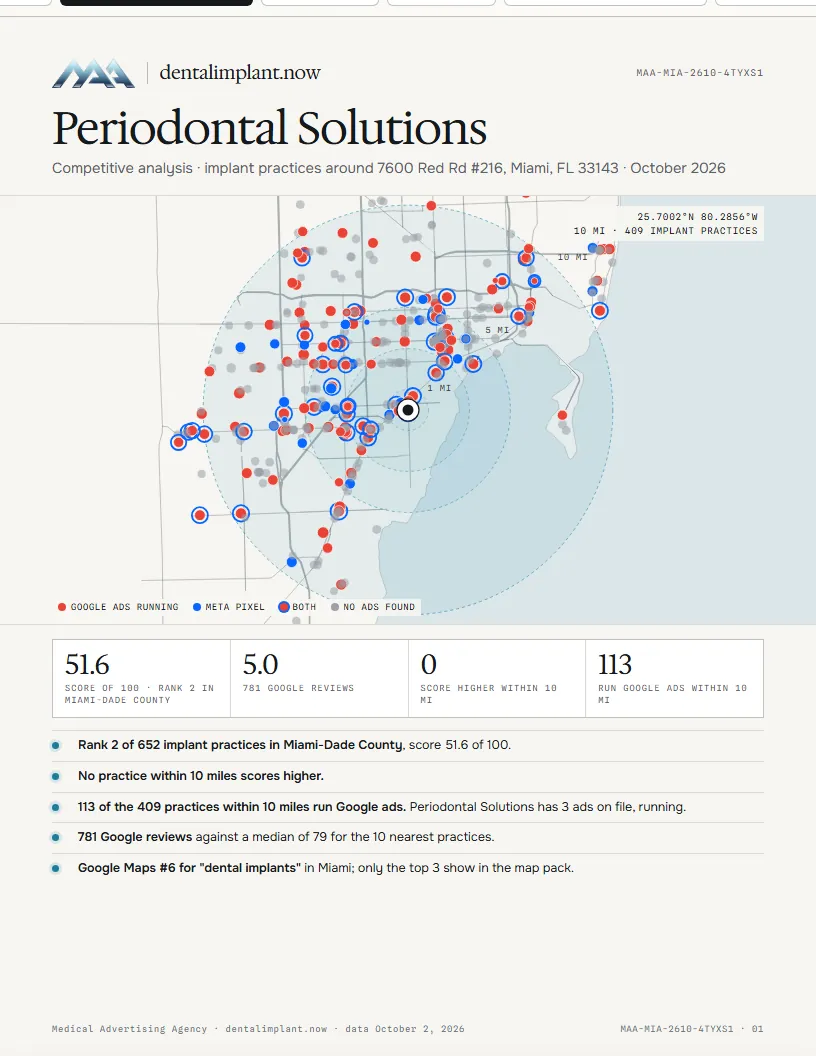
- Competitor reportOne doctor: score and its inputs, Google rating and reviews, the nearest and highest-scoring competitors with their scores, reviews, Google ads, Meta Pixel and website size, the ads they run, their websites, Google search positions and a SWOT. From the PDF column of a call list, the map card, the prospect file or the dossier.
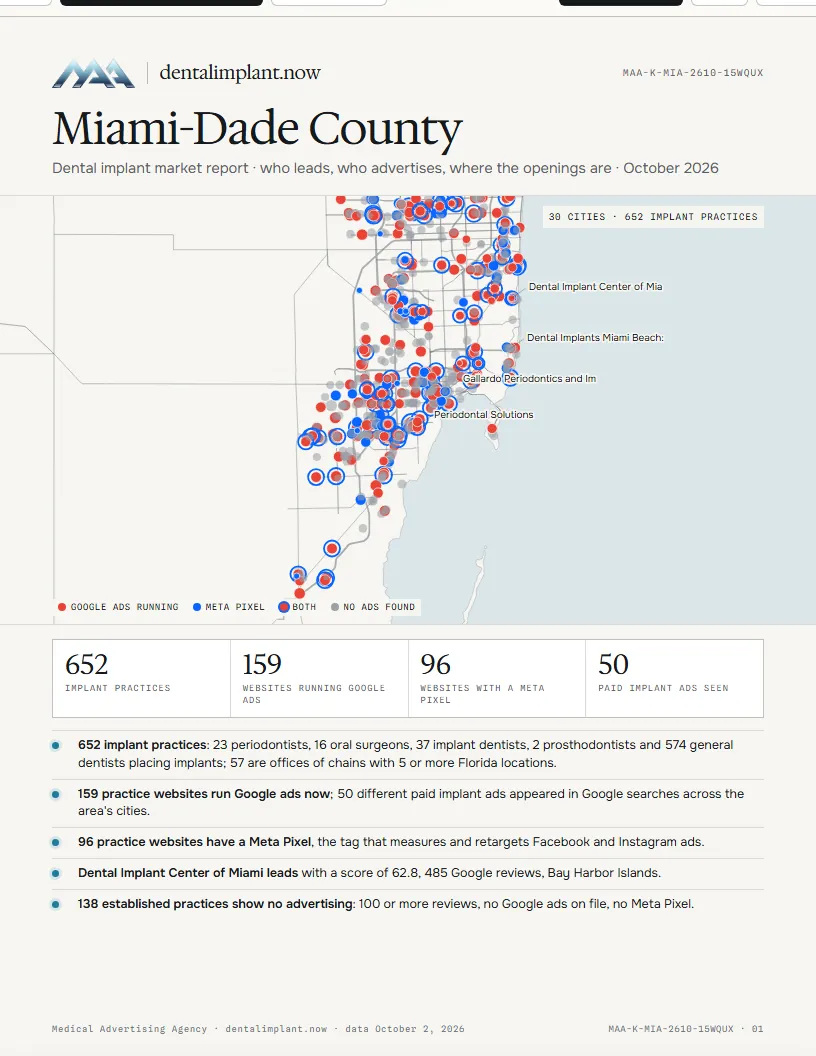
- Market reportOne city, county or region: the leading practices, who advertises, the ads on file, websites, established practices with no ads and who patients see first on Google. From the report buttons above each call list.
- Ready-made PDFsListed above the call list when one matches the area, and on the sales home.
5
First call, step by step
- Sign in. /sales/login/, then pick a region on the sales home.
- Pick the area. A county or city, or Near me with your city or ZIP.
- Work down the call list. Start with Running ads: those practices already pay for advertising.
- Read the prospect file. Why the tier, and the competitors ahead within 10 miles.
- Open the sales dossier. Who advertises around them, the signal matrix, where they show on Google.
- Warm up. Send the Instagram or Facebook message and the email. Tick each step.
- Call. Tap the phone number. Name the competitor from the message and the distance.
- Call again, then walk in. Bring their competitor report and the market report for their county.
- Log it. Set Hot, Warm or Cold and add a note after every contact.
6
What the data means
Score, 100 points
The public ranking. Method: /methodology/.
| Input | Max | Measured by | Counted today |
|---|---|---|---|
| Reviews | 30 | Google review count, log scale, full 25 at 500+; Google rating, 4.0 = 0 to 5.0 = 5 | Yes |
| Visibility | 30 | Google search (top 30 for four implant keywords) and Google Maps rank, against the county leader | Yes |
| Associations | 10 | Implant association listings, 2 each up to 6; Florida society listings, 2 each up to 4 | Yes |
| Leadership and teaching | 15 | Officer or board of an association (8); lectured at an implant meeting (7) | Officer and board only |
| Work shown | 10 | Implant page on the practice site (3); before and after gallery (5); implant video (2) | Implant page only |
| Recognition | 5 | Implant papers in PubMed (3); implant company doctor locator (2) | Company locator only |
Tier, sales only
One point for each signal. Tier 1: four or five. Tier 2: two or three. Tier 3: one or none.
| Signal | Point when |
|---|---|
| Implant page | The practice website has a dental implant page |
| Doctor type | Implant dentist, or general dentist performing implants |
| Competitors ahead | Three or more implant practices within 10 miles score higher |
| Established | 50 or more Google reviews |
| Pays for ads | Google ads active, a Meta Pixel on the site, or a Google Ads tag on the site |
Advertising fields
| Field | Meaning | Source |
|---|---|---|
| Google ads active | An ad shown in the last 35 days; the number is ads on file | Google Ads Transparency Center |
| Google ads on file | Ads on record, none shown in the last 35 days | Google Ads Transparency Center |
| No Google ads found | Checked, no ads on record | Google Ads Transparency Center |
| Google ads not checked | No check on file for that website | |
| Meta Pixel | Meta's tracking code on the homepage, a sign of Facebook or Instagram ads | Practice homepage |
| Google Ads tag | Google's ad conversion tag on the homepage | Practice homepage |
| Site pages | Pages listed in the site map | Practice site map |
| Rank | Position by score among the practices in the same county | Score |
7
What saves where
Team work saves to the sales database on dentalimplant.now; files save to your computer.
| What | Where it saves | Who sees it |
|---|---|---|
| Status: Hot, Warm or Cold | Team database, on each tap | Every rep who logs in |
| Warm-up steps | Team database, on each tick | Every rep who logs in |
| Notes, with your name and the time | Team database, on Save note | Every rep who logs in |
| Your name | This browser | You; it is printed on your notes |
| Call list (.csv), prospect file (.txt), dossier (.txt), competitors (.csv) | Downloads folder on your computer | You |
| Competitor report for a doctor; market report for a city, county or region | PDF from the print window (Save as PDF) | You |
| Ready-made market report PDFs | Downloads folder, from the call list or the sales home | You |
Near me uses the browser's location; where the browser blocks it, type a city or ZIP.